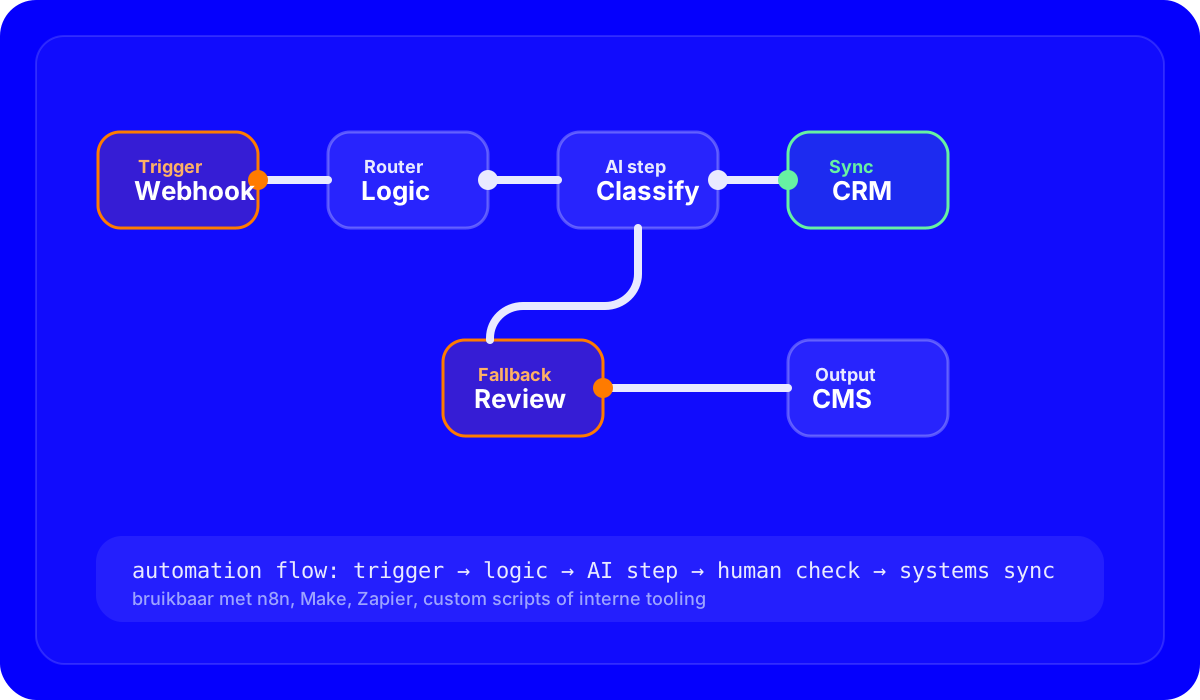
Why workflow automation often pays off faster than expected
Companies often underestimate how much time disappears into small manual steps: copying data between tools, sending internal updates, processing forms, changing statuses, approving content or structuring files. Each task looks small on its own, but together they often create a large amount of operational friction.
Workflow automation works well because it does not start with a massive transformation project. It starts with one concrete process. As soon as you automate one flow in a stable way, there is usually immediate room to improve surrounding steps as well.
Which processes are the best fit
- Repetitive work: the same steps come back again and again with limited variation.
- Clear triggers: a form submission, an email, a CRM update or a change in a data source.
- Multiple tools: the more often people switch manually between tools, the larger the automation opportunity.
Why flexible workflow tools are often the right foundation
The best automation layer is rarely “the most popular tool.” It is the stack that fits your processes, integrations and team. Sometimes n8n is the best choice because of its flexibility and API-first approach. In other cases, Make, Zapier, custom scripts or an internal workflow layer make more sense. What matters is that you can model logic, exceptions, AI steps and human controls clearly without creating technical debt.
Een formulier, webhook, CRM-event of documentstart zet de flow in gang.
Rules, routes en filters bepalen welke vervolgstappen nodig zijn.
Alleen waar classificatie, samenvatting of interpretatie echt waarde toevoegt.
Review, approval of fallback houdt kwaliteitscontrole in de keten.
Where AI does and does not belong inside automation
AI is not a mandatory layer in every workflow. Sometimes a clean rule-based flow is enough. AI only becomes useful when a step requires interpretation: summarizing text, classifying leads, structuring documents, checking content or extracting context from unstructured input. On top of that, you need to decide when human review remains mandatory. Otherwise you scale mistakes along with the automation.
The biggest gain usually does not come from flashy AI, but from fewer handoff moments between tools.
A flow without logging or alerts fails silently. That is when damage starts to accumulate.
For critical output, human review often remains a feature rather than a weakness.
When a flow has real project value
If employees repeat the same actions across tools, forms and email threads, there is a strong chance that one well-designed workflow will immediately save time and reduce errors. That is why automation often becomes profitable faster than expected.
View automationWhy error handling and monitoring are not optional
A workflow that runs perfectly for one month and then starts failing unnoticed can create more damage than manual work. That is why good automation needs status notifications, logging, fallback paths and clear ownership. Who notices when an API fails? What happens when input is incomplete? Where can someone intervene manually?
What a strong automation trajectory looks like
A good trajectory starts with process mapping. After that, you define triggers, sources, logic, exceptions and the desired output. Only then do you choose the tool that fits best and decide where AI may add value. That way, tooling does not dictate the solution; the process does.
| Fragile flow | Robust flow |
|---|---|
| No logging or alerts | Clear monitoring and error reporting |
| AI makes decisions without control | Human check where risk or quality matters |
| Disconnected automations per tool | One clear end-to-end workflow |